
This is the second post in my venture into the world of investing. In the first post, I talked about compound interest — what I consider the “first principle” of investing. This post is about the next natural question: how do you actually put your money to work?
The answer is building a portfolio — a combination of assets like stocks and bonds. Which assets to hold, and in what proportions, is one of the most consequential decisions in personal investing. It’s also not straightforward: there are many approaches to choose from, and they can lead to very different outcomes over time.
Before committing to a portfolio, I wanted to see how different strategies have actually performed historically. Past performance doesn’t guarantee future results, but it reveals how different strategies have behaved through real market conditions. So I went looking for tools that could help.
The common tools didn’t quite fit. Google Finance and Yahoo Finance both require entering a specific number of shares for each asset — but when designing a portfolio, the natural unit is percentages (“60% stocks, 40% bonds”), not share counts. Portfolio Visualizer looked more promising, but it’s behind a paywall. I wanted something I could freely tinker with.
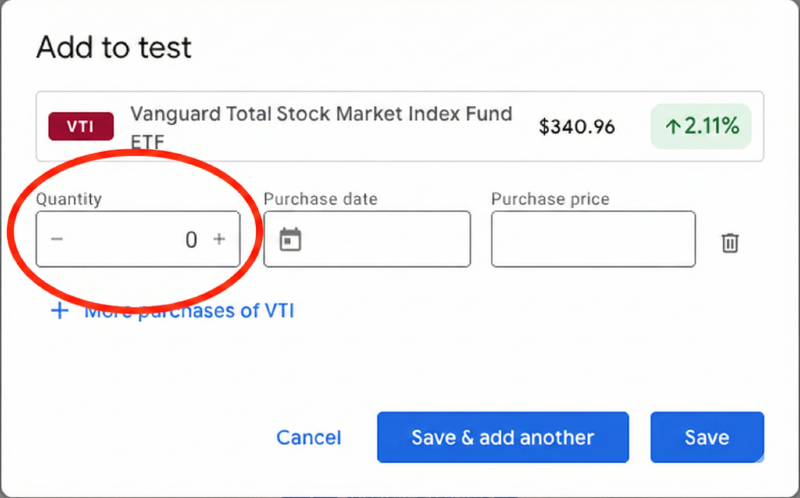
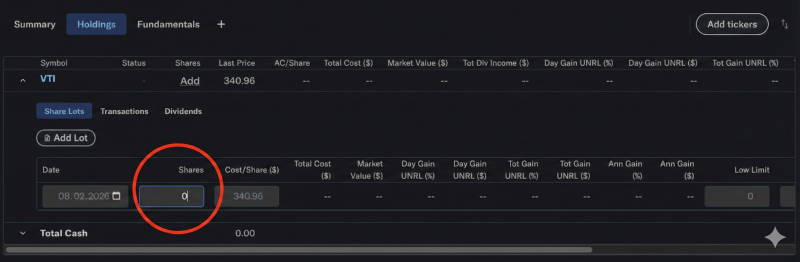
Since I’m a software engineer, the obvious next thought was: why not build it myself? With the promise of vibe coding, I gave it a try this weekend and built Portfolio Playground, a web application for analyzing and comparing investment portfolios.
What I Built #
Portfolio Playground lets you build custom investment portfolios from real market data, visualize their historical performance, and compare key risk/return metrics side by side. Here’s what it can do.
Portfolio Builder. You search for any ticker symbol with autocomplete powered by yfinance, assign percentage weights, and create a named portfolio. Want to compare a tech-heavy portfolio against a diversified index fund? Build both and see the results immediately.
Preset Portfolios. For quick benchmarking, there are one-click presets: S&P 500 (VOO), NASDAQ 100 (QQQ), Developed Markets ex-US (VEA), Emerging Markets (VWO), Gold (GLD), Bitcoin (IBIT), and Volatility (VIXY). These make it easy to compare your custom portfolio against common benchmarks.
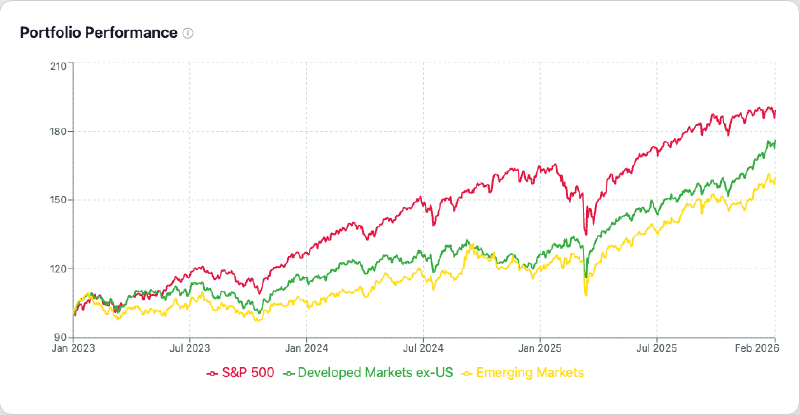
Performance Chart. All portfolios are plotted on a normalized $100-start line chart with a configurable date range. The normalization makes comparison fair regardless of actual share prices. Interactive tooltips and hover highlighting let you drill into specific dates and portfolios.
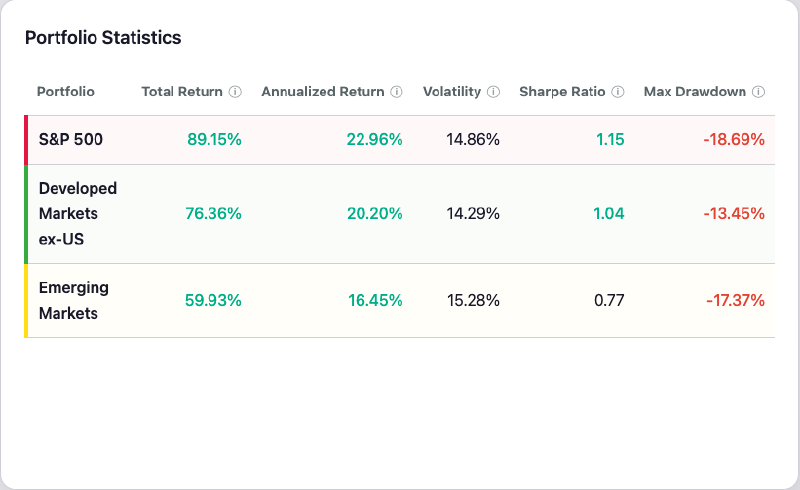
Statistics Table. A side-by-side comparison of Total Return, Annualized Return, Volatility, Sharpe Ratio, and Max Drawdown. Each metric has a tooltip explaining what it measures. If you read my previous post on compounding, you’ll recognize some of these metrics — annualized return is essentially the compound growth rate I discussed there.
Multi-Currency Support. You can view all results in any of 36 currencies — from major ones like USD, EUR, GBP, JPY, and CHF to emerging-market currencies like BRL, CNY, INR, and KRW. The app fetches real exchange rates and applies the conversion, so you can see how your portfolio performs in the currency you actually spend.
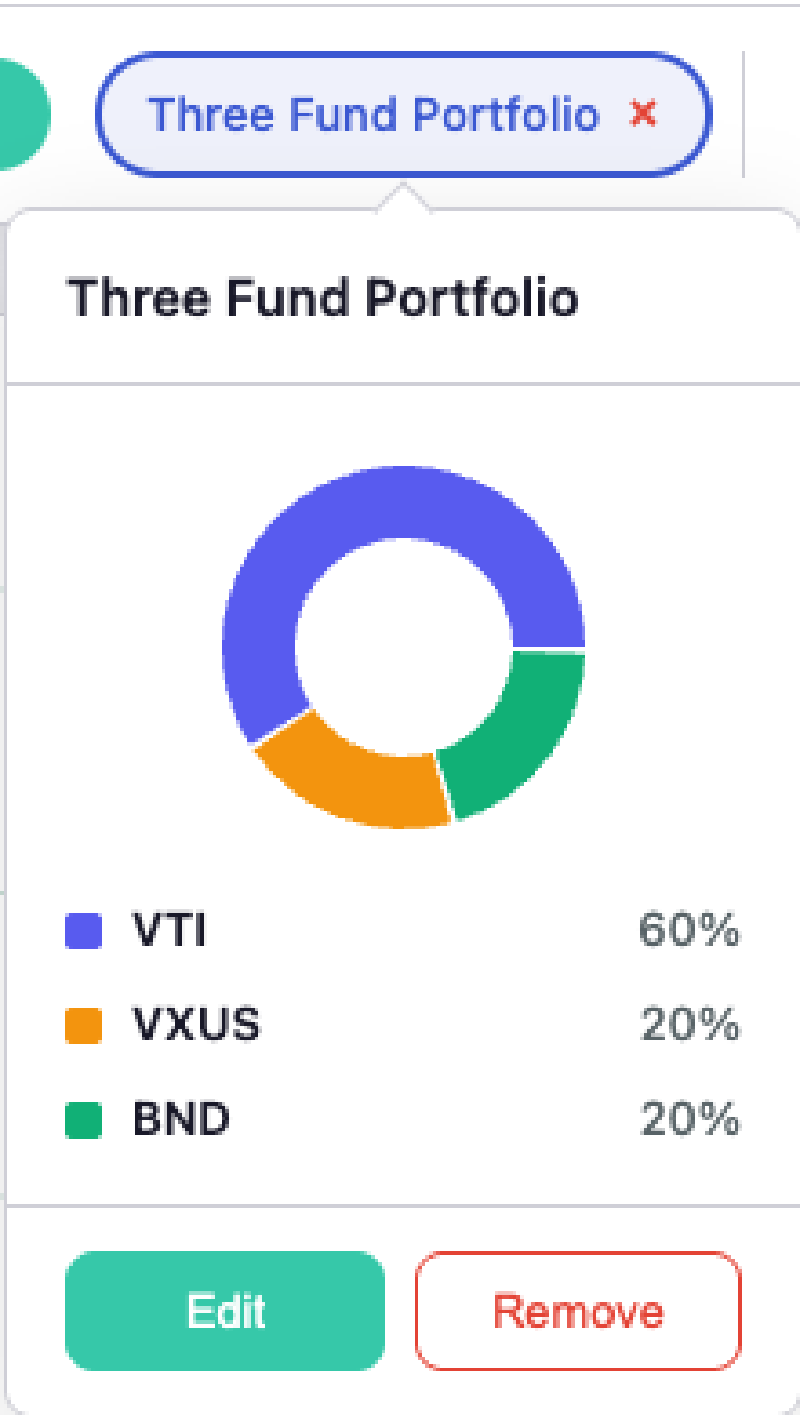
Asset Allocation View. Hover over any portfolio chip to see a donut chart breakdown of its holdings and weights. It’s a small detail, but it makes it much easier to remember what’s inside each portfolio when you’re comparing several at once.
For a detailed technical breakdown of the architecture and implementation, see the GitHub repository.
Reflecting on the Vibe Coding Experience #
Vibe coding is a term coined by Andrej Karpathy to describe a style of programming where you describe what you want in natural language and AI writes the code. You don’t type code yourself — you guide, review, and iterate. Portfolio Playground was built entirely this way. 100% of the code was AI-generated.
Speed and momentum. The most striking thing about vibe coding is the pace. Ideas turn into working features at unprecedented speed. I’d describe a feature, AI would implement it, I’d see the result, and I was already thinking about the next thing. The feedback loop is tight and addictive — there’s a momentum that builds when the gap between “I want this” and “it works” shrinks dramatically.
When things move this fast, ambition grows. In traditional development, the time and effort required to build something often leads to aggressive scoping. Engineers cut corners, leave TODOs scattered through the code — placeholders for improvements that may never happen. Vibe coding flips this dynamic. When the cost of building is low, it’s just easy to try an idea. There’s a creative flow that emerges — it feels more like designing a product than grinding through code.
Closing the skills gap. I am not good at frontend development, and many of the technologies used in this project — Next.js, Typescript, Recharts, FastAPI — are things I have never worked with before. Normally, working with unfamiliar technologies means slow progress and constant trips to Stack Overflow when things go wrong. With vibe coding, this bottleneck mostly went away. I could focus on what the UI should look like and how it should behave, and let AI handle the implementation details — CSS, component structure, state management, all of it. The result is a frontend I’m genuinely happy with, built far faster than I could have managed on my own.
The side-project motivation problem. Side projects with a full-time job can easily stall: start on a free weekend, make some progress, then work or life gets in the way. By the time people come back to it, they’ve forgotten the code, the dev environment needs updating, and the motivation has evaporated. Vibe coding compresses the build cycle so drastically that this problem is much less likely to happen. Portfolio Playground went from idea to working product in a single weekend. I started on Saturday afternoon, the MVP was deployed by late Saturday night, and more features were added and deployed on Sunday. There was no “coming back to it later” — it was done before the motivation could fade.
Scope creep, the good kind. When adding a feature costs minutes instead of hours, you naturally add more. For example, multi-currency support wasn’t in my original plan, but it was cheap to try, so I just added it. The project ended up more feature-rich than I originally envisioned.
Human judgment still matters. While AI wrote all the code, I made every product decision. Which metrics to include, how the chart should behave on hover, what the UX flow should feel like, which preset portfolios make sense — these all required understanding of the domain. AI also makes mistakes, and I still needed to direct it to fix them — sometimes by sending screenshots of what went wrong, sometimes by asking AI to double-check its own work, or by suggesting a different approach. AI is a powerful executor, but it needs a clear direction and active oversight.
Vibe-debugging can be hard. When you didn’t write the code, you don’t have the same intuition for where the issue might be. There were moments where AI needed course-correcting — building a feature differently from what was asked for, or introducing a subtle bug that only showed up in certain edge cases. These moments required stepping back, understanding what the code was actually doing, and redirecting.
Final Thoughts #
In my previous post, I wrote about engineers shifting from coders to orchestrators. Building Portfolio Playground was that shift in practice — I focused on product decisions and direction, AI handled the implementation. If you’re curious, check out the live app or the source code on GitHub.
Disclaimers #
This post and the accompanying webapp are for informational and educational purposes only. I am not a professional investor or financial advisor, nor do I claim to be, and use of this webapp does not create an advisory relationship. Data may be inaccurate, delayed, or incomplete, and I do not accept responsibility for any such inaccuracies. The content reflects my personal research and understanding and should not be interpreted as professional advice. You are solely responsible for your financial decisions — consult a qualified financial professional before making investment decisions.
The webapp is deployed using free tiers of Render and Vercel, so its availability is not guaranteed.